DJI Pilot plugin for public safety
Three words for wherever your laser is pointing.
LaserFix converts the target under your drone's laser rangefinder into a what3words address and an Ordnance Survey grid reference, in a small panel on top of DJI Pilot's camera view. Aim, press, read it out.
Available only to public safety organisations: police, fire and rescue, ambulance, search and rescue, and other emergency responders.
Now in beta. Sign up with your organisation email; we check and approve each account.
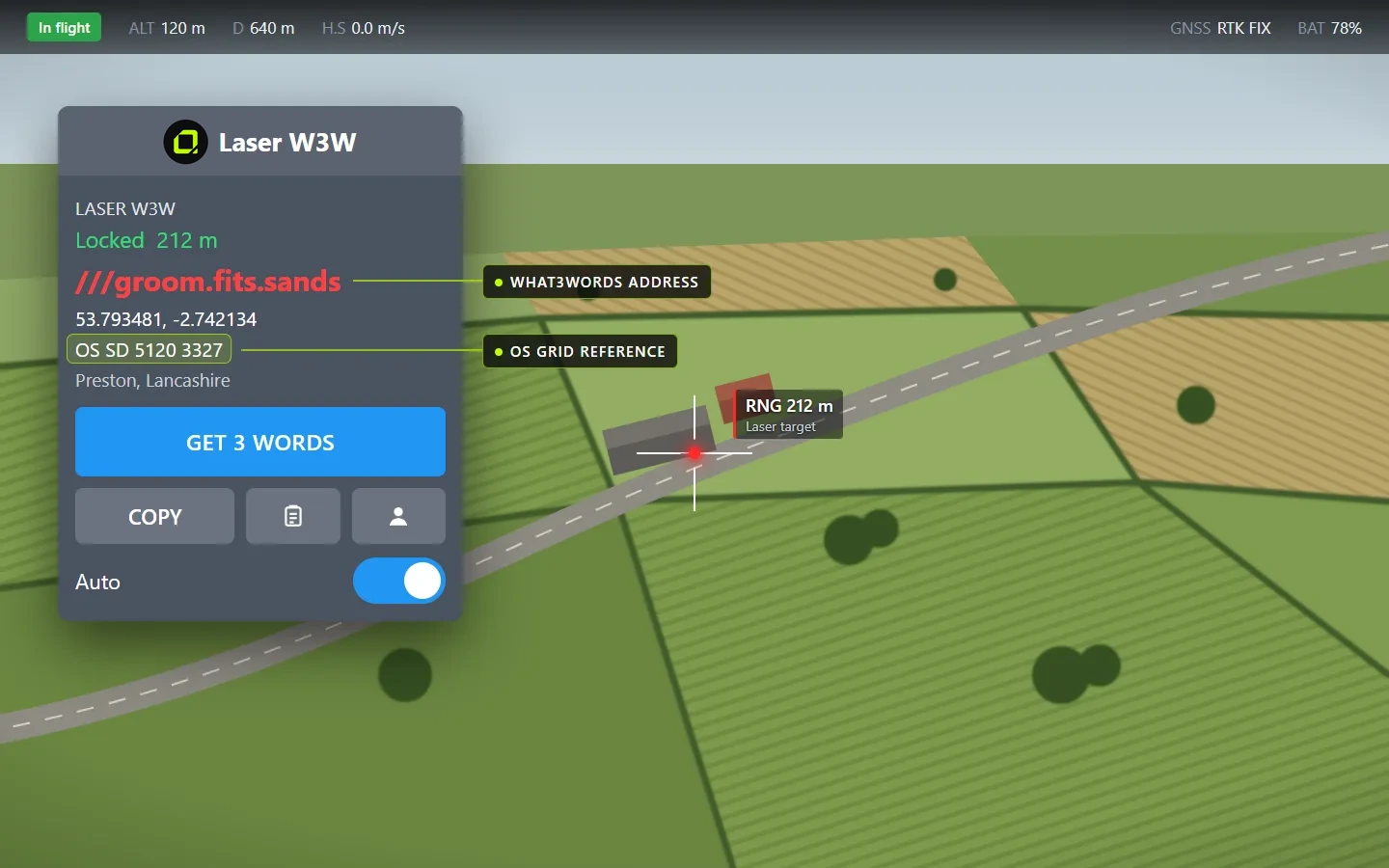
Illustration of the panel in DJI Pilot. Example address and grid reference.
On screen, in flight
Two ways to say where it is
Every conversion gives you both, for the same point, so you can pass the location on in whichever form the person on the other end uses.
///groom.fits.sands
A 3 m square anywhere in the world, easy to read over a radio and used by many UK emergency services.
OS SD 5120 3327
An 8-figure reference to a 10 m square, worked out on the controller itself. Blank outside Great Britain.
Features
Built for the pilot, not the desk
Laser target to three words
Turn on the rangefinder in DJI Pilot, aim, and press Get 3 Words. The panel shows the what3words address of the exact point the laser is on.
Ordnance Survey grid reference
The same point as an 8-figure OS grid reference, worked out on the controller with no internet needed. Ready for crews and control rooms that work in grid.
Coordinates and nearest place
Latitude and longitude of the converted point, plus the nearest place name, so the address can be sanity-checked at a glance.
Auto mode
Switch on Auto and the address updates as the aim moves 3 m or more, at most once every 3 seconds.
Copy and log
Copy puts the words, coordinates and grid reference on the clipboard. Every marked target is logged and can be shared as a CSV file.
Never stale
If the laser moves away from the converted point, the panel says so, so the words on screen are never mistaken for the current aim.
Hands off the aircraft
The plugin only listens to the rangefinder. It never switches the laser on or off, so it cannot interfere with Pilot or the flight.
Private by design
The service stores no coordinates, no three-word addresses and no place names. The what3words key lives on the server, never on a controller.
How it works
Nothing new to learn in the air
Sign in once
Sign in on the controller with a code sent to your work email. We check the account belongs to a public safety organisation and approve it, and the sign-in is kept on that controller.
Open Pilot as normal
Open LaserFix once and a small panel floats over Pilot's camera view.
Aim the laser
Fly and aim as usual and turn on the rangefinder (RNG). The panel shows the laser status and range.
Get 3 words
Press Get 3 Words, or leave Auto on. Read out, copy or log the address and grid reference.
Compatibility
Aircraft and controllers
LaserFix runs as a plugin inside DJI Pilot on the RC Plus 2 Enterprise. It works with the aircraft DJI supports for Pilot plugins that carry a laser rangefinder.
| Aircraft | Status | Notes |
|---|---|---|
| Matrice 4E / 4T | Supported | Listed by DJI for Pilot plugins |
| Matrice 4D | Supported | Listed by DJI for Pilot plugins |
| Matrice 5T | Supported | Listed by DJI for Pilot plugins |
| Matrice 400 | Supported | Listed by DJI for Pilot plugins, with a rangefinder payload such as the Zenmuse H30 |
| Matrice 4TD | Confirm | Not named separately by DJI; confirm on the aircraft |
| Matrice 30 / 300 / 350 | Not supported | These use the original RC Plus, which does not run Pilot plugins |
Fly for a public safety organisation?
Sign up with your organisation email. Once we've confirmed the account belongs to a police, fire, ambulance, search and rescue or other public safety team, you can download the plugin and install it on your controller.